Cyber Security Health Check
for Microsoft 365
Automated cybersecurity assessment of your M365 environment. No IT expertise required.
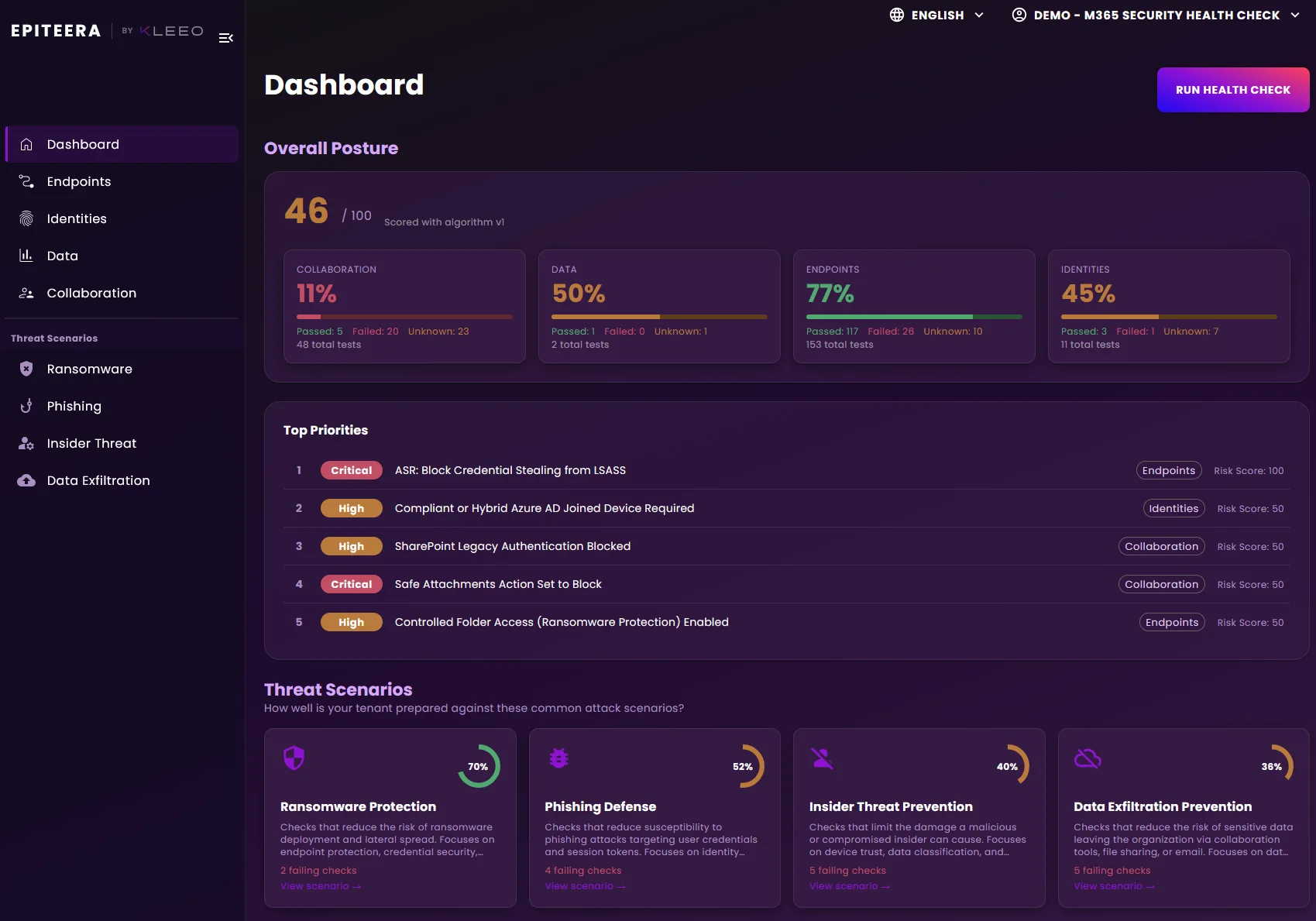
Automated cybersecurity assessment of your M365 environment. No IT expertise required.
Get a clear picture of your Microsoft 365 security posture - with actionable recommendations you can act on today.
See your entire M365 security posture in one dashboard - devices, identities, data, and collaboration.
Receive clear, prioritized steps to improve your security - no guessing, no jargon, just what matters.
Best practices evolve - our analysis updates automatically so you're always assessed against the latest standards.
Designed for business owners and managers - not just security professionals. Understand your risks immediately.
No installation, no complex setup. Connect your tenant securely and get your results within minutes.
Sign in with your Microsoft 365 corporate account via Single Sign-On. No new passwords to manage.
Link your M365 tenant securely. We only read configuration data - your content and files are never accessed.
One click starts the automated analysis. Your personalised security dashboard is ready in minutes.
A comprehensive assessment across the areas that matter most for your Microsoft 365 environment.
Windows & macOS protection status, antivirus configuration, disk encryption, and password policy compliance.
User account security, admin privilege oversight, and Conditional Access Policy configuration.
Data classifications, Data Loss Prevention policies, and Microsoft Information Protection label coverage.
Teams, SharePoint, and OneDrive security settings - including external sharing and guest access controls.
One flat subscription per tenant - no per-user fees, no hidden costs.
For organisations with dedicated IT teams that need advanced controls, SLA guarantees, and tailored reporting. Pricing is negotiated based on your requirements.
Talk to usFor IT providers and managed service providers who need to assess and monitor security across an entire client portfolio. Pricing is based on your number of tenants.
Talk to usPractical guidance on securing your Microsoft 365 environment - no jargon, no vendor fluff.
Why getting the Microsoft 365 security basics right still matters - and how Epiteera helps organisations observe, prioritise, and act on what needs attention most.
Read more →MFA is not new, but it still matters. Learn how to enforce it correctly across all users, protect admins with phishing-resistant methods, and avoid common weak patterns.
Read more →Device onboarding into Microsoft Intune is one of the first steps in any M365 security improvement. Learn why visibility over endpoints is a security basic.
Read more →Everything you need to know before running your Microsoft 365 security health check.
Epiteera is an automated security assessment for Microsoft 365. It scans your tenant configuration across four areas - devices, identities, data and collaboration - and gives you findings scored by severity, with step-by-step remediation guidance for each one.
Minutes. There is nothing to install: you sign in with your Microsoft 365 account, an administrator grants consent once (it takes less than two minutes), and one click starts the analysis. Your security dashboard is ready within minutes.
A Global Administrator, or an administrator with an equivalent role, grants admin consent once through Microsoft's official consent page. Epiteera only reads configuration data, such as Conditional Access policies, device configurations and sharing settings. Your emails, documents and files are never accessed.
The permissions are the minimum needed to run the health check, and you can review or revoke them at any time in the Microsoft Entra admin centre under Enterprise Applications. Read how admin consent works.
Microsoft 365 Business Premium, E3 and E5. Business Basic and Business Standard are not supported, because they do not include Intune, Defender for Business or Conditional Access - the core features the health check assesses.
Epiteera runs on Microsoft Azure in Switzerland. Kleeo GmbH is a Swiss company, so data processing is primarily subject to Swiss data protection law, and we meet GDPR requirements where they apply. Epiteera never stores your Microsoft credentials: sign-in is handled entirely by Microsoft Entra ID. See our Privacy Policy for details.
One flat subscription per tenant, with no per-user fees. Essential (1-200 users) is CHF 49 per month and Business (200-500 users) is CHF 79 per month. Annual billing saves around 20%. Enterprise and MSP pricing is tailored to your requirements. Compare plans.
On-demand. Your security dashboard shows your overall posture and how it develops over time, and the analysis is updated automatically as Microsoft 365 security best practices evolve.
No. Findings are written in plain language and ranked by severity, so you know what to fix first. Each one comes with step-by-step recommendations tailored to your licence and configuration.
Yes. The MSP plan lets you assess and monitor all your client tenants from one dashboard, with per-client and portfolio-level views of security posture. White-label reporting is available as an optional add-on, and pricing is based on your number of tenants.
Run an automated M365 security assessment - no IT expertise or manual input required.
Start your Health Check